Overview
The Serial Peripheral Interface (SPI) is a high speed serial communication that commonly use three wires, serial clock, serial data and enable (master transmit only). Most of modern micro-controller has this serial communication interface. It is useful for board to board or to device communication due to wiring complexity compare to parallel port data transmission.
 |
| SN74HC595N LED Driving |
SPI is popular among graphical display, Flash memory, I/O expansion chip, SRAM, EEPROM, real time clock chip etc. Its transmission and reception speed could reach up to several Mbits/s. These are some example of SPI devices:
- DS3234 Real Time Clock
- Nokia 5510 graphical LCD module
- MCP23S17 I/O Expansion Chip
- SN74HC595N Serial In Parallel Out Shift Registers
- ILI9341/ST7785 240x320 TFT Display
- ST7735 128x160 TFT Display
- W25Q64JVSSIQ Flash Memory Chip
- SD MMC Card etc.
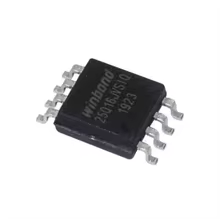 |
| W25Q64JVSSIQ |


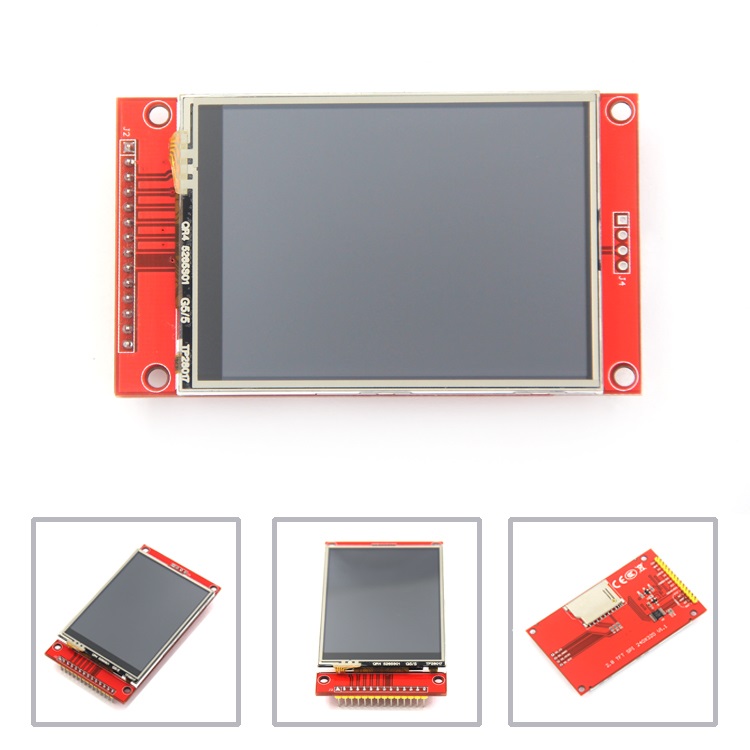 |
| ILI9341/ST7785 240x320 TFT Display |
Some earlier MCU doesn't have an SPI module inside for instance the AT89S52 or PIC16F84A. However the programmer could emulate a software SPI by using the bit-banging technique. This method is popular but it yield a lower speed data transmission and reception.
Typically a system operation contains a master MCU that transmit and receive data from its connected SPI slave devices.
 |
| Single master to single slave: basic SPI wiring |
The pin names of the SPI module in the AVR micro-controller are different from other MCU such as PIC. These pins are:
| Abbr. | Name | Description |
|---|---|---|
SS | Slave Select | Active-low chip select signal from master to enable communication with a specific slave device |
SCLK | Serial Clock | Clock signal from master |
MOSI | Master Out Slave In | Serial data output from master |
MISO | Master In Slave Out | Serial data output from slave |
The master MCU must select any connected SPI slave device via its slave select (SS) pin. One slave device has a unique SS pin. So multiple slave devices have many SS pins.
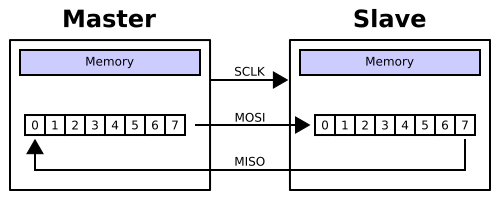 |
| A typical hardware setup using two shift registers to form an inter-chip circular buffer |
Its clock polarity is commonly positive (low to high). Somes device use a negative (high to low) clock polarity.

However its clock polarity and phase are configured by user software that requires an understanding of technical detail of an MCU (Dedicated SPI Module).
The master MCU can communicates with many different SPI slave devices (Multidrop SPI bus) on a single bus using additional SS pins.
 |
| Multidrop SPI bus |
If multiple SPI slave devices with the same type connect to a single SPI bus we can use the Daisy chain configuration. For instance the SN74HC595N or SN74HC164 serial in parallel out shift registers.
 |
| Daisy chain configuration |
It is used for expanding a number of output ports for instance driving a dot matrix display.
Currently there are a lot of newer method of SPI data transmission that is precise and high speed.
ATMega644P Serial Peripheral Interface
The SPI module of the ATMega644P has the following features:
• Full-duplex, Three-wire Synchronous Data Transfer
• Master or Slave Operation
• LSB First or MSB First Data Transfer
• Seven Programmable Bit Rates
• End of Transmission Interrupt Flag
• Write Collision Flag Protection
• Wake-up from Idle Mode
• Double Speed (CK/2) Master SPI Mode
Its operation mode and speed are configured in user program via its relevant special function registers.
 |
| SPI Block Diagram |
Its clock generator is divided form the MCU clock up to CK/2. Data is shifted in and out using its internal 8-bit shift register at each clock cycle of the SPI clock generator. It also generate interrupt flag whenever the shift registers is empty.
 |
| SPI Master-slave Interconnection |
These are its relevant registers:
- SPCR – SPI Control Register
 |
| SPCR – SPI Control Register |
- SPSR – SPI Status Register
 |
| SPSR – SPI Status Register |
- SPDR – SPI Data Register
 |
| SPDR – SPI Data Register |
The ATMega644P may operate in master transmit only, slave receive only or even full duplex (synchronous data transfer) depending on these registers. For more detail please see the device datasheet.
ATMega644P SPI Interfacing and Programming
We can configure the SPI module of the ATMega644P to operates in a specific mode depends on the worked application.
SPI Master Transmit Mode
An SPI master transmits only is common. There are many SPI slave device that only need data reception such as the SN74HC595N or 74HC164 shift register chips.
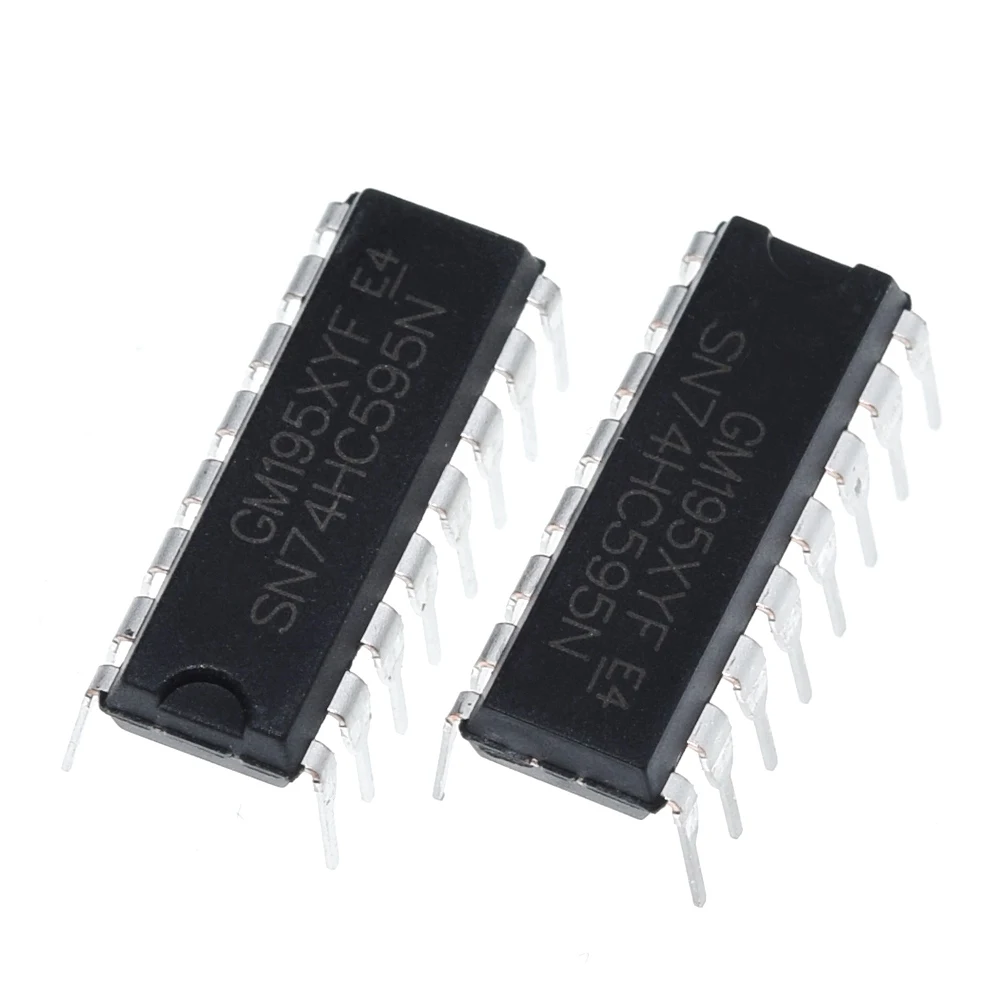  |
| SN74HC595N and SN74HC164N Shift Registers |
These chips is very popular due to its availability, low cost, ease of control etc. The SN74HC595N is commonly found in output expanding application such as relays driving, LED driving especially the dot matrix display driver.
 |
| SN74HC595N Pin Diagram |
In this example the ATMega644P operate in master mode to transmit data to the SN74HC595N shifter register chip. The output port of this chip can connects to LED, 7-Segment displays or even a character LCD.
There are sample code of using the SPI transmit in device data sheet in both Assembly and C program.
 |
| Sample Code |
LED Driving
I have a DIY single chip SN74HC595N LED module that is very easy to make. However we can install them together on a single breadboard.
 |
| A completed Soldering Board |
 |
| Copper Side |
For more information about this DIY PCB see this post.
The program is very simple.
- /*
- * 12-spi_74hc595_led.c
- *
- * Created: 2/14/2026 6:57:01 PM
- * Author : Admin
- */
- #include <avr/io.h>
- #include <util/delay.h>
- #define F_CPU 16000000UL
- #define DDR_SPI DDRB
- #define PRT_SPI PORTB
- #define DD_MOSI 5
- #define DD_SCK 7
- #define DD_SS 4
- void SPI_MasterInit(void)
- {
- /* Set MOSI and SCK output, all others input */
- DDR_SPI = (1<<DD_MOSI)|(1<<DD_SCK)|(1<<DD_SS);
- /* Enable SPI, Master, set clock rate fck/16 */
- SPCR = (1<<SPE)|(1<<MSTR)|(1<<SPR0);
- }
- void SPI_MasterTransmit(char cData)
- {
- /* Start transmission */
- SPDR = cData;
- /* Wait for transmission complete */
- while(!(SPSR & (1<<SPIF)))
- ;
- }
- int main(void)
- {
- /* Replace with your application code */
- SPI_MasterInit();
- char i=0;
- while (1)
- {
- SPI_MasterTransmit(1<<i);
- PRT_SPI&=~(1<<DD_SS);
- _delay_us(100);
- PRT_SPI=(1<<DD_SS);
- _delay_us(100);
- i++;
- if(i>8) i=0;
- _delay_ms(100);
- }
- }
Schematic:
 |
| SN74HC595N LED Driving |
AVR Experiment Board:
|
| SN74HC595N LED Driving |
 |
| SN74HC595N LED Driving |
 |
| SN74HC595N LED Driving |
The program just shift each bits of the SN74HC595N output port.
Seven Segments Display Driving
I made a single common cathode 7-Segment display that is driven by an SN74HC595N chip. So it's easy for the MCU to connect to this display using a little wires.
 |
| Fully Solder Board |
 |
| Copper Side After I Soldered. |
Source Code:
- /*
- * 12-spi_74hc595_7.c
- *
- * Created: 2/14/2026 9:42:04 PM
- * Author : Admin
- */
- #include <avr/io.h>
- #include <util/delay.h>
- #define F_CPU 16000000UL
- //Common Anode
- const char ca_7[16]={0xC0, 0xF9, 0xA4, 0xB0,0x99, 0x92,
- 0x82, 0xF8, 0x80, 0x90, 0x88, 0x83, 0xA7, 0xA1, 0x86, 0x8E};
- //Common Cathode
- const char cc_7[16]={0x3F,0x06,0x5B,0x4F,0x66,0x6D,0x7D,
- 0x07,0x7F,0x6F,0x77,0x7C,0x39,0x5E,0x79,0x71};
- #define DDR_SPI DDRB
- #define PRT_SPI PORTB
- #define DD_MOSI 5
- #define DD_SCK 7
- #define DD_SS 4
- void SPI_MasterInit(void)
- {
- /* Set MOSI and SCK output, all others input */
- DDR_SPI = (1<<DD_MOSI)|(1<<DD_SCK)|(1<<DD_SS);
- /* Enable SPI, Master, set clock rate fck/16 */
- SPCR = (1<<SPE)|(1<<MSTR)|(1<<SPR0);
- }
- void SPI_MasterTransmit(char cData)
- {
- /* Start transmission */
- SPDR = cData;
- /* Wait for transmission complete */
- while(!(SPSR & (1<<SPIF)))
- ;
- }
- int main(void)
- {
- /* Replace with your application code */
- SPI_MasterInit();
- char i=0;
- while (1)
- {
- SPI_MasterTransmit(ca_7[i]);
- PRT_SPI&=~(1<<DD_SS);
- _delay_us(100);
- PRT_SPI=(1<<DD_SS);
- _delay_us(100);
- i++;
- if(i>15) i=0;
- _delay_ms(500);
- }
- }
Schematic:
 |
| Seven Segments Display Driving |
Master Transmits and Slave Receives
An MCU operates in master or slave depends on software configuration. In this example one ATMega644P operates in master transmit only mode while another one operates in slave receive only.
 |
| Code examples show how to initialize the SPI as a Slave and how to perform a simple reception. |
For master MCU the Slave Select (SS or PB4) pin (output mode) goes low whenever it start sending data out. For slave MCU whenever this pin (input mode) goes low data starts shift into its shift register at each clock cycle of SPI data transmission. However this pin is select-able by user software during transmission.
Source Code "main.c" for master MCU:
- /*
- * 12-spi_master_slave.c
- *
- * Created: 2/14/2026 11:01:07 PM
- * Author : Admin
- */
- #include <avr/io.h>
- #include <util/delay.h>
- #define F_CPU 16000000UL
- //Common Anode
- const char ca_7[16]={0xC0, 0xF9, 0xA4, 0xB0,0x99, 0x92,
- 0x82, 0xF8, 0x80, 0x90, 0x88, 0x83, 0xA7, 0xA1, 0x86, 0x8E};
- //Common Cathode
- const char cc_7[16]={0x3F,0x06,0x5B,0x4F,0x66,0x6D,0x7D,
- 0x07,0x7F,0x6F,0x77,0x7C,0x39,0x5E,0x79,0x71};
- #define DDR_SPI DDRB
- #define PRT_SPI PORTB
- #define DD_MOSI 5
- #define DD_MISO 6
- #define DD_SCK 7
- #define DD_SS 4
- void SPI_MasterInit(void)
- {
- /* Set MOSI and SCK output, all others input */
- DDR_SPI = (1<<DD_MOSI)|(1<<DD_SCK)|(1<<DD_SS);
- /* Enable SPI, Master, set clock rate fck/16 */
- SPCR = (1<<SPE)|(1<<MSTR)|(1<<SPR0);
- }
- void SPI_MasterTransmit(char cData)
- {
- /* Start transmission */
- SPDR = cData;
- /* Wait for transmission complete */
- while(!(SPSR & (1<<SPIF)))
- ;
- }
- void SPI_SlaveInit(void)
- {
- /* Set MISO output, all others input */
- DDR_SPI = (1<<DD_MISO);
- /* Enable SPI */
- SPCR = (1<<SPE);
- }
- char SPI_SlaveReceive(void)
- {
- /* Wait for reception complete */
- while(!(SPSR & (1<<SPIF)))
- ;
- /* Return Data Register */
- return SPDR;
- }
- int main(void)
- {
- /* Replace with your application code */
- SPI_MasterInit();
- char i=0;
- while (1)
- {
- SPI_MasterTransmit(1<<i);
- _delay_ms(500);
- i++;
- if(i>7) i=0;
- _delay_ms(500);
- }
- }
Source Code "main.c" for slave MCU:
- /*
- * 12-spi_slave.c
- *
- * Created: 2/14/2026 11:05:48 PM
- * Author : Admin
- */
- #include <avr/io.h>
- #include <util/delay.h>
- #define F_CPU 16000000UL
- #define DDR_SPI DDRB
- #define PRT_SPI PORTB
- #define DD_MOSI 5
- #define DD_MISO 6
- #define DD_SCK 7
- #define DD_SS 4
- void SPI_MasterInit(void)
- {
- /* Set MOSI and SCK output, all others input */
- DDR_SPI = (1<<DD_MOSI)|(1<<DD_SCK)|(1<<DD_SS);
- /* Enable SPI, Master, set clock rate fck/16 */
- SPCR = (1<<SPE)|(1<<MSTR)|(1<<SPR0);
- }
- void SPI_MasterTransmit(char cData)
- {
- /* Start transmission */
- SPDR = cData;
- /* Wait for transmission complete */
- while(!(SPSR & (1<<SPIF)))
- ;
- }
- void SPI_SlaveInit(void)
- {
- /* Set MISO output, all others input */
- DDR_SPI &= ~(1<<DD_MISO);
- /* Enable SPI */
- SPCR = (1<<SPE);
- }
- char SPI_SlaveReceive(void)
- {
- /* Wait for reception complete */
- while(!(SPSR & (1<<SPIF)))
- ;
- /* Return Data Register */
- return SPDR;
- }
- int main(void)
- {
- /* Replace with your application code */
- SPI_SlaveInit();
- DDRC=0xFF;
- char i=0;
- while (1)
- {
- PORTC=SPI_SlaveReceive();
- _delay_ms(500);
- }
- }
Schematic:
 |
| Schematic |
I have only one ATMega644 chip so I just simulate it using a simulator.
Here the master MCU read the ADC input with a variable voltage, convert it into voltage data before sending to its slave MCU. Thee slave MCU keep listening to the master receiving the voltage data and it will present on two 7-Segment displays.
 |
| Schematic |
The contains three data bytes, slave adress (0xC1), decimal voltage value and fraction point.
Source Code "main.c" for master MCU:
- /*
- * 12-spi_master_slave.c
- *
- * Created: 2/14/2026 11:01:07 PM
- * Author : Admin
- */
- #include <avr/io.h>
- #include <util/delay.h>
- #define F_CPU 16000000UL
- //Common Anode
- const char ca_7[16]={0xC0, 0xF9, 0xA4, 0xB0,0x99, 0x92,
- 0x82, 0xF8, 0x80, 0x90, 0x88, 0x83, 0xA7, 0xA1, 0x86, 0x8E};
- //Common Cathode
- const char cc_7[16]={0x3F,0x06,0x5B,0x4F,0x66,0x6D,0x7D,
- 0x07,0x7F,0x6F,0x77,0x7C,0x39,0x5E,0x79,0x71};
- const char slave_address=0xC1;
- #define DDR_SPI DDRB
- #define PRT_SPI PORTB
- #define DD_MOSI 5
- #define DD_MISO 6
- #define DD_SCK 7
- #define DD_SS 4
- void SPI_MasterInit(void)
- {
- /* Set MOSI and SCK output, all others input */
- DDR_SPI = (1<<DD_MOSI)|(1<<DD_SCK)|(1<<DD_SS);
- /* Enable SPI, Master, set clock rate fck/16 */
- SPCR = (1<<SPE)|(1<<MSTR)|(1<<SPR0);
- }
- void SPI_MasterTransmit(char cData)
- {
- /* Start transmission */
- SPDR = cData;
- /* Wait for transmission complete */
- while(!(SPSR & (1<<SPIF)))
- ;
- }
- void SPI_SlaveInit(void)
- {
- /* Set MISO output, all others input */
- DDR_SPI = (1<<DD_MISO);
- /* Enable SPI */
- SPCR = (1<<SPE);
- }
- char SPI_SlaveReceive(void)
- {
- /* Wait for reception complete */
- while(!(SPSR & (1<<SPIF)))
- ;
- /* Return Data Register */
- return SPDR;
- }
- int main(void)
- {
- /* Replace with your application code */
- SPI_MasterInit();
- //Turn on the ADC module
- ADCSRA=(1<<ADEN);
- //Select ADC0
- ADMUX=0;
- char i=0;
- long temp=0;
- while (1)
- {
- //Start the conversion
- ADCSRA|=(1<<ADSC);
- //Wait for the completion
- while((ADCSRA&(1<<ADSC))==1);
- //Read the result
- temp=ADCL+(ADCH<<8);
- temp=temp*50/1023;
- //Send data bytes
- PRT_SPI&=~(1<<DD_SS);
- SPI_MasterTransmit(slave_address);
- SPI_MasterTransmit(cc_7[temp/10]|0x80);
- SPI_MasterTransmit(cc_7[temp%10]);
- PRT_SPI|=(1<<DD_SS);
- _delay_ms(1000);
- }
- }
Source Code "main.c" for slave MCU:
- /*
- * 12-spi_slave.c
- *
- * Created: 2/14/2026 11:05:48 PM
- * Author : Admin
- */
- #include <avr/io.h>
- #include <util/delay.h>
- #define F_CPU 16000000UL
- const char slave_address=0xC1;
- #define DDR_SPI DDRB
- #define PRT_SPI PORTB
- #define DD_MOSI 5
- #define DD_MISO 6
- #define DD_SCK 7
- #define DD_SS 4
- void SPI_MasterInit(void)
- {
- /* Set MOSI and SCK output, all others input */
- DDR_SPI = (1<<DD_MOSI)|(1<<DD_SCK)|(1<<DD_SS);
- /* Enable SPI, Master, set clock rate fck/16 */
- SPCR = (1<<SPE)|(1<<MSTR)|(1<<SPR0);
- }
- void SPI_MasterTransmit(char cData)
- {
- /* Start transmission */
- SPDR = cData;
- /* Wait for transmission complete */
- while(!(SPSR & (1<<SPIF)))
- ;
- }
- void SPI_SlaveInit(void)
- {
- /* Set MISO output, all others input */
- DDR_SPI &= ~(1<<DD_MISO);
- /* Enable SPI */
- SPCR = (1<<SPE);
- }
- char SPI_SlaveReceive(void)
- {
- /* Wait for reception complete */
- while(!(SPSR & (1<<SPIF)))
- ;
- /* Return Data Register */
- return SPDR;
- }
- struct spi_data{
- char address;
- char voltage;
- char fraction;
- };
- int main(void)
- {
- /* Replace with your application code */
- SPI_SlaveInit();
- DDRD=0xFF;
- DDRA=0xFF;
- DDRC=0xFF;
- struct spi_data _data;
- while (1)
- {
- _data.address=SPI_SlaveReceive();
- _data.voltage=SPI_SlaveReceive();
- _data.fraction=SPI_SlaveReceive();
- if (_data.address!=slave_address)
- {
- _data.voltage=_data.fraction=0x71;
- }
- PORTA=_data.voltage;
- PORTC=_data.fraction;
- }
- }
Full-Duplex Mode
The ATMega644P able to operate in full-duplex mode (three-wire synchronous data transfer). It means that during data transmission it also has data reception at the same time.
|
| SPI Master-slave Interconnection |
For master MCU data is shifted out via MOSI pin and shifted in via MISO pin during transmission. For slave MCU data is shifted in via MOSI pin and shifted out via MISO pin during reception. The Slave Select (SS) pin is ignore here because it's controlled by SPI hardware.
 |
| Schematic and Program Simulation |
In this example a master ATMega644P send PORTD input data to its slave ATMega644P device. At slave side received data will show on PORTC and it send back PORTD input data to its master MCU. The master MCU show received data from slave device on PORTC.
 |
| Simulate Program Wave Form |
Master MCU Source Code "main.c":
- /*
- * master.c
- *
- * Created: 2/15/2026 4:38:04 PM
- * Author : Admin
- */
- #include <avr/io.h>
- #include <util/delay.h>
- #define F_CPU 16000000UL
- #define DDR_SPI DDRB
- #define PRT_SPI PORTB
- #define DD_MOSI 5
- #define DD_MISO 6
- #define DD_SCK 7
- #define DD_SS 4
- void SPI_MasterInit(void)
- {
- /* Set MOSI and SCK output, all others input */
- DDR_SPI = (1<<DD_MOSI)|(1<<DD_SCK)|(1<<DD_SS);
- /* Enable SPI, Master, set clock rate fck/16 */
- SPCR = (1<<SPE)|(1<<MSTR)|(1<<SPR0);
- }
- void SPI_MasterTransmit(char cData)
- {
- /* Start transmission */
- SPDR = cData;
- /* Wait for transmission complete */
- while(!(SPSR & (1<<SPIF)))
- ;
- }
- void SPI_SlaveInit(void)
- {
- /* Set MISO output, all others input */
- DDR_SPI = (1<<DD_MISO);
- /* Enable SPI */
- SPCR = (1<<SPE);
- }
- char SPI_SlaveReceive(void)
- {
- /* Wait for reception complete */
- while(!(SPSR & (1<<SPIF)))
- ;
- /* Return Data Register */
- return SPDR;
- }
- int main(void)
- {
- /* Replace with your application code */
- SPI_MasterInit();
- DDRD=0x00;
- DDRC=0xFF;
- PORTD=0xFF;
- while (1)
- {
- //Send data bytes
- //PRT_SPI&=~(1<<DD_SS);
- SPI_MasterTransmit(PIND);
- PORTC=SPI_SlaveReceive();
- //PRT_SPI|=(1<<DD_SS);
- _delay_ms(100);
- }
- }
Slave MCU Source Code "main.c":
- /*
- * slave.c
- *
- * Created: 2/15/2026 4:39:00 PM
- * Author : Admin
- */
- #include <avr/io.h>
- #include <util/delay.h>
- #define F_CPU 16000000UL
- #define DDR_SPI DDRB
- #define PRT_SPI PORTB
- #define DD_MOSI 5
- #define DD_MISO 6
- #define DD_SCK 7
- #define DD_SS 4
- void SPI_MasterInit(void)
- {
- /* Set MOSI and SCK output, all others input */
- DDR_SPI = (1<<DD_MOSI)|(1<<DD_SCK)|(1<<DD_SS);
- /* Enable SPI, Master, set clock rate fck/16 */
- SPCR = (1<<SPE)|(1<<MSTR)|(1<<SPR0);
- }
- void SPI_MasterTransmit(char cData)
- {
- /* Start transmission */
- SPDR = cData;
- /* Wait for transmission complete */
- while(!(SPSR & (1<<SPIF)))
- ;
- }
- void SPI_SlaveInit(void)
- {
- /* Set MISO output, all others input */
- DDR_SPI = (1<<DD_MISO);
- /* Enable SPI */
- SPCR = (1<<SPE);
- }
- char SPI_SlaveReceive(void)
- {
- /* Wait for reception complete */
- while(!(SPSR & (1<<SPIF)))
- ;
- /* Return Data Register */
- return SPDR;
- }
- int main(void)
- {
- /* Replace with your application code */
- SPI_SlaveInit();
- DDRD=0x00;
- DDRC=0xFF;
- PIND=0xFF;
- while (1)
- {
- PORTC=SPI_SlaveReceive();
- SPI_MasterTransmit(PIND);
- _delay_ms(10);
- }
- }
At this time I only one AVR device so I can not test it in physical hardware.

No comments:
Post a Comment