The Two Wire Interface (TWI) is a serial communication protocol that uses only two wires, Serial Data (SDA) and Serial Clock (SCL). In some micro-controllers especially the PIC family it called I2C (Inter Integrated Circuit). It's bi-directional between master and slave devices. The MCU is a master device whenever it interfaces to a TWI peripheral device for instance a Real Time Clock (RTC). However between two TWI micro-controllers the user can select one of them to be a master or a slave device. For more information about the I2C please visit this link.
 |
| AVR ATMega644P Prototype Board |
There are a lot TWI slave devices, EEPROM, Real Time Clock (RTC), Environmental Sensor and Graphical Display etc. For example,
- DS1307, DS3231 RTC
- AT24C08, AT24C16B EEPROM
- BME280 Temperature and Humidity Sensor
- SH1106 SD1306 OLED Display
The ATMega644P TWI Interface
The ATMega644P has a TWI module that use a 7-bit addressing that allows up to 127 connection devices. It supports up to 400kHz clock rate via its baud rate generator and its pre-scaler. For more information about the TWI of AVR micro-controller please see this link. I won't write it here anymore due to duplication.
 |
| TWI Bus Interconnection |
Since the clock and data pins of the TWI are open-drain they need two weak pull up resistors between 4.7kΩ to 10kΩ. It depends on the wires length, data and clock rate.
 |
| Overview of the TWI Module |
The programmer must configure these registers to set a proper operation of the TWI:
- TWBR – TWI Bit Rate Register
- TWCR – TWI Control Register
- TWSR – TWI Status Register
- TWDR – TWI Data Register
- TWAR – TWI (Slave) Address Register
- TWAMR – TWI (Slave) Address Mask Register
Its SCL frequency is the clock rate of the TWI transmission. It is calculated via this equation:
 |
| SCL frequency
|
For more information please the datasheet of this device.
The DS1307 Real Time Clock (RTC)
This is an old TWI RTC chip released a few decade now. Its function is not rich compare to newer TWI RTC chip for instance the DS3231 RTC. It communication interface and internal organization is very simple.
 |
| The DS1307 Chip and RTC Module |
 |
| DS1307 Pin Diagrams |
 |
| TYPICAL OPERATING CIRCUIT |
Its date and time data are stored in device's SRAM. The SRAM contains date, time, configuration and user data. SRAM data are keep alive by an additional back up battery typically a CR2032 coin battery.
 |
| Timekeeper Registers |
In this example the MCU read its time and date data and display them on a character LCD. This program requires the HD44780 LCD driver that I don't put them here. Please see this link. We just need to copy the hd44780.h and the hd44780.c to project source folder and add them to the project.
- /*
- * 10-i2c_ds1307_lcd.c
- *
- * Created: 1/31/2026 8:15:30 AM
- * Author : Admin
- */
- #include <avr/io.h>
- #include <util/delay.h>
- #include <stdio.h>
- #define F_CPU 16000000UL
- void i2cInit(void){
- TWSR|=0x00; //Prescaler Selection Bit
- TWBR=0xF0; //Baud Rate Generator
- TWCR=(1<<TWEN); //Enable The TWI Module
- PORTC|=(1<<0);
- PORTC|=(1<<1);
- }
- void i2cStart(void){
- TWCR=(1<<TWINT)|(1<<TWSTA)|(1<<TWEN);
- while((TWCR&(1<<TWINT))==0);
- }
- void i2cWrite(unsigned char data){
- TWDR=data;
- TWCR=(1<<TWINT)|(1<<TWEN);
- while((TWCR&(1<<TWINT))==0);
- }
- unsigned char i2cRead(char ACK){
- if(ACK==0)
- TWCR=(1<<TWINT)|(1<<TWEN)|(1<<TWEA);
- else
- TWCR=(1<<TWINT)|(1<<TWEN);
- while((TWCR&(1<<TWINT))==0);
- return TWDR;
- }
- void i2cStop(){
- TWCR=(1<<TWINT)|(1<<TWEN)|(1<<TWSTO);
- _delay_us(10);
- }
- void rtc_init(void){
- //i2cStart();
- /*D0 is DS1307 Write Address*/
- //i2cWrite(0xD0);
- /*Select Control Register*/
- //i2cWrite(0x07);
- /*Enable SQWE bit blinks at 1 Hz*/
- //i2cWrite(1<<4);
- //i2cStop();
- //_delay_ms(1);
- char rtc[8]={0x30,0x00,0x17,0x07,0x31,0x01,0x26,1<<4};
- for (char i=0;i<8;i++)
- {
- i2cStart();
- //D0 is DS1307 Write Address
- i2cWrite(0xD0);
- //Select Control Register
- i2cWrite(i);
- //Enable SQWE bit blinks at 1 Hz
- i2cWrite(rtc[i]);
- i2cStop();
- _delay_ms(10);
- }
- }
- struct rtc{
- char Seconds;
- char Minutes;
- char Hours;
- char Day;
- char Date;
- char Month;
- char Year;
- char Control;
- };
- char rtc[6], msg[16];
- int main(void)
- {
- _delay_ms(1000);
- DDRB=0xFF;
- struct rtc my_rtc={0x30,0x00,0x03,0x07,0x31,0x01,0x26,1<<4};
- i2cInit();
- lcd_init();
- lcd_text("ATMega644P I2C");
- lcd_xy(1,2);
- lcd_text("ds1307 RTC");
- _delay_ms(10000);
- lcd_clear();
- char count;
- lcd_command(0x0C);
- //rtc_init();
- char counter=0;
- while (1)
- {
- for(char i=0;i<7;i++){
- /*Second Register*/
- i2cStart();
- i2cWrite(0xD0);
- /*Select Second register*/
- i2cWrite(i);
- i2cStop();
- _delay_us(10);
- i2cStart();
- i2cWrite(0xD1);
- rtc[i]=i2cRead(1);
- i2cStop();
- _delay_us(10);
- //PORTB=rtc[i];
- }
- lcd_xy(1,1);
- sprintf(msg,"Time: %02X:%02X:%02X",rtc[2],rtc[1],rtc[0]);
- lcd_text(msg);
- lcd_xy(1,2);
- sprintf(msg,"Date: %02X/%02X/20%02X",rtc[4],rtc[5],rtc[6]);
- lcd_text(msg);
- counter++;
- if(counter>=2) { PORTB=1; counter=0;}
- else PORTB=0;
- _delay_ms(500);
- }
- }
However the HD44780 LCD driver is placed in separated package, "hd44780.h" and "hd44780.c". We just copy this two files into the project source folder with the "main.c". Then we just include the "hd44780.c" in main function to be able calling its functions. Anyway if we add the "hd44780.c" files into project workspace we don't need to include it in main C source file.
The hd44780.h
- /*
- * hd44780.h
- *
- * Created: 1/28/2026 9:56:39 PM
- * Author: Admin
- */
- #ifndef HD44780_H_
- #define HD44780_H_
- #endif /* HD44780_H_ */
- #include <avr/io.h>
- #include <stdio.h>
- #include <util/delay.h>
- #define F_CPU 16000000UL
- #define RS 2
- #define EN 3
- const char d_time=50;
- void lcd_command(char command);
- void lcd_data(char data);
- void lcd_init(void);
- void lcd_xy(char x, char y);
- void lcd_text(char *text);
- void lcd_clear(void);
The hd44780.c
- /*
- * hd44780.c
- *
- * Created: 1/28/2026 9:55:18 PM
- * Author: Admin
- */
- #include "hd44780.h"
- void lcd_command(char command){
- char temp;
- temp=command&0xF0;
- PORTC=temp|(1<<EN);
- _delay_us(d_time);
- PORTC=temp;
- _delay_us(d_time);
- temp=command<<4;
- PORTC=temp|(1<<EN);
- _delay_us(d_time);
- PORTC=temp;
- _delay_us(d_time);
- }
- void lcd_data(char data){
- char temp;
- temp=data&0xF0;
- PORTC=temp|(1<<EN)|(1<<RS);
- _delay_us(d_time);
- PORTC=temp|(1<<RS);
- _delay_us(d_time);
- temp=data<<4;
- PORTC=temp|(1<<EN)|(1<<RS);
- _delay_us(d_time);
- PORTC=temp|(1<<RS);
- _delay_us(d_time);
- }
- void lcd_init(void){
- DDRC=0xFF;
- lcd_command(0x33);
- _delay_us(100);
- lcd_command(0x32);
- _delay_us(100);
- lcd_command(0x28);
- _delay_us(100);
- lcd_command(0x0F);
- _delay_us(100);
- lcd_command(0x01);
- _delay_ms(5);
- lcd_command(0x06);
- _delay_us(100);
- }
- void lcd_xy(char x, char y){
- char addr[]={0x80,0xC0};
- lcd_command(addr[y-1]+x-1);
- }
- void lcd_text(char *text){
- while(*text) lcd_data(*text++);
- }
- void lcd_clear(void){
- lcd_command(0x01);
- _delay_ms(5);
- }
The RTC chip is halted whenever it's newly inserted or error by the MCU program for instance a high speed TWI clock rate.
Shematic:
 |
| Schematic and Simulation |
AVR Prototype Board:
 |
| Start Up Screen |
 |
| Date and Time Reading |
This PCB also has a 6-digit common cathode display. Here The RTC time value will display on this display instead:
Source Code:
- /*
- * 10-i2c_ds1307_7.c
- *
- * Created: 2/1/2026 4:02:12 PM
- * Author : Admin
- */
- #include <avr/io.h>
- #include <util/delay.h>
- #define F_CPU 16000000UL
- const char d_time=5;
- const char cc_7[16]={0x3F,0x06,0x5B,0x4F,0x66,0x6D,0x7D,
- 0x07,0x7F,0x6F,0x77,0x7C,0x39,0x5E,0x79,0x71};
- volatile long count=0,temp=0;
- unsigned int loop_count=0;
- char rtc[6],digits=0;
- void i2cInit(void){
- TWSR|=0x00; //Prescaler Selection Bit
- TWBR=0xF0; //Baud Rate Generator
- TWCR=(1<<TWEN); //Enable The TWI Module
- PORTC|=(1<<0);
- PORTC|=(1<<1);
- }
- void i2cStart(void){
- TWCR=(1<<TWINT)|(1<<TWSTA)|(1<<TWEN);
- while((TWCR&(1<<TWINT))==0);
- }
- void i2cWrite(unsigned char data){
- TWDR=data;
- TWCR=(1<<TWINT)|(1<<TWEN);
- while((TWCR&(1<<TWINT))==0);
- }
- unsigned char i2cRead(char ACK){
- if(ACK==0)
- TWCR=(1<<TWINT)|(1<<TWEN)|(1<<TWEA);
- else
- TWCR=(1<<TWINT)|(1<<TWEN);
- while((TWCR&(1<<TWINT))==0);
- return TWDR;
- }
- void i2cStop(){
- TWCR=(1<<TWINT)|(1<<TWEN)|(1<<TWSTO);
- _delay_us(10);
- }
- void rtc_init(void){
- char rtc[8]={0x30,0x00,0x17,0x07,0x31,0x01,0x26,1<<4};
- for (char i=0;i<7;i++)
- {
- i2cStart();
- //D0 is DS1307 Write Address
- i2cWrite(0xD0);
- //Select Control Register
- i2cWrite(i);
- //Enable SQWE bit blinks at 1 Hz
- i2cWrite(rtc[i]);
- i2cStop();
- _delay_ms(10);
- }
- }
- void show_ds1307(int times){
- for (int i=0;i<times;i++)
- {
- PORTC=0;
- PORTB=cc_7[13];
- PORTC=0x20;
- _delay_ms(d_time);
- PORTC=0;
- PORTB=cc_7[5];
- PORTC=0x40;
- _delay_ms(d_time);
- PORTC=0;
- PORTB=cc_7[1];
- PORTC=0x80;
- _delay_ms(d_time);
- PORTC=0;
- PORTB=cc_7[3];
- PORTC=0x04;
- _delay_ms(d_time);
- PORTC=0;
- PORTB=cc_7[0];
- PORTC=0x08;
- _delay_ms(d_time);
- PORTC=0;
- PORTB=cc_7[7];
- PORTC=0x10;
- _delay_ms(d_time);
- }
- }
- void rtc_read(void){
- for(char i=0;i<3;i++){
- /*Second Register*/
- i2cStart();
- i2cWrite(0xD0);
- /*Select Second register*/
- i2cWrite(i);
- i2cStop();
- //_delay_us(10);
- i2cStart();
- i2cWrite(0xD1);
- rtc[i]=i2cRead(1);
- i2cStop();
- //_delay_us(10);
- }
- }
- int main(void)
- {
- /* Replace with your application code */
- _delay_ms(1000);
- DDRB=0xFF;
- DDRC=0xFF;
- i2cInit();
- show_ds1307(200);
- //rtc_init();
- rtc_read();
- while (1)
- {
- PORTC=0;
- PORTB=cc_7[rtc[2]>>4];
- PORTC=0x20;
- _delay_ms(d_time);
- PORTC=0;
- PORTB=cc_7[rtc[2]&0x0F];
- PORTC=0x40;
- _delay_ms(d_time);
- PORTC=0;
- PORTB=cc_7[rtc[1]>>4];
- PORTC=0x80;
- _delay_ms(d_time);
- PORTC=0;
- PORTB=cc_7[rtc[1]&0x0F];
- PORTC=0x04;
- _delay_ms(d_time);
- PORTC=0;
- PORTB=cc_7[rtc[0]>>4];
- PORTC=0x08;
- _delay_ms(d_time);
- PORTC=0;
- PORTB=cc_7[rtc[0]&0x0F];
- PORTC=0x10;
- _delay_ms(d_time);
- temp++;
- if(temp>=30){temp=0;rtc_read();}
- }
- }
Schematic:
 |
| Schematic and Simulation |
AVR Prototype Board:


This PCB was offered from PCBWay.
I have been using PCBWay for many years now. PCBWay fabricate PCBs at low cost, fast processing time for only 24 hours, and fast delivery time using any carrier options. This double side 10cmx10cm can be fabricate at only 5USD for 5 to 10pcs by PCBWay. It's a standard PCB with silk screen and solder mask.
 |
| 10 PCBs for only 5USD |
For different size of PCB we can instantly quote on PCBWay website using a zip PCB Gerber file without account.
 |
| PCBWay Instant Quote |
The AT24C16B TWI EEPROM
The EEPROM is an auxiliary persistent storage behind the MCU's internal EEPROM and Flash when they have capacity limited. The TWI has an advantage of adding the device on the same bus without adding additional MCU's wire. However they operate at lower speed than the one's in the MCU. The TWI EEPROM was commonly found in most of old TV motherboard since the micro-processor has limited resource at that time.
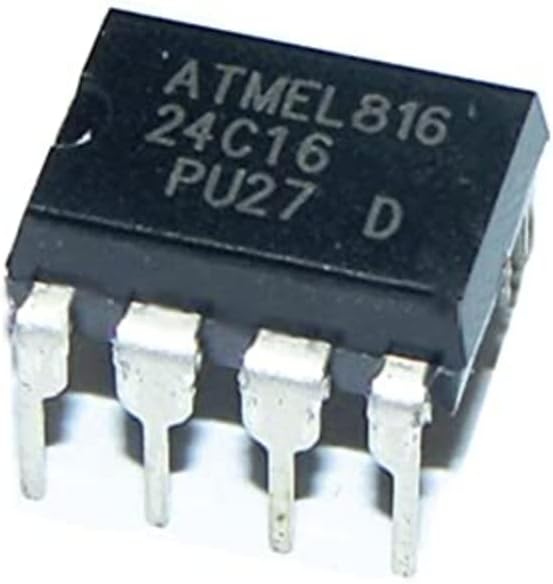 |
| A Sample of AT24C16B |
I bought one lot of ten pieces of this chip since I was at college.
 |
| Atmel AT24C16B Spec |
The AT24C16B is a TWI 16kB (2048x8) EEPROM memory storage from Atmel. However is not obsolete now. Currently there are a lot of new EEPROM with a larger memory space, low power and fast write read speed.
 |
| Block Diagram of AT24C16B |
The write speed of this chip is around 100ms. So the programmer must lower the TWI clock frequency and wait for writing completion by adding delay time between write cycle.
The default write address of this chip is 0xA0 and 0xA1 is read address.
The example below the ATMega644P write data into the AT24C16B using different data and addresses. The result will display on the character LCD and LED.
- /*
- * 10-i2c_at24c16b_lcd.c
- *
- * Created: 1/31/2026 6:33:03 PM
- * Author : Admin
- */
- #include <avr/io.h>
- #include <util/delay.h>
- #include <stdio.h>
- #define F_CPU 16000000UL
- const write_address=0xA0;
- const read_address=0xA1;
- void i2cInit(void){
- TWSR|=0x03; //Prescaler Selection Bit
- TWBR=0xF0; //Baud Rate Generator
- TWCR=(1<<TWEN); //Enable The TWI Module
- PORTC|=(1<<0);
- PORTC|=(1<<1);
- }
- void i2cStart(void){
- TWCR=(1<<TWINT)|(1<<TWSTA)|(1<<TWEN);
- while((TWCR&(1<<TWINT))==0);
- }
- void i2cWrite(unsigned char data){
- TWDR=data;
- TWCR=(1<<TWINT)|(1<<TWEN);
- while((TWCR&(1<<TWINT))==0);
- }
- unsigned char i2cRead(char ACK){
- if(ACK==0)
- TWCR=(1<<TWINT)|(1<<TWEN)|(1<<TWEA);
- else
- TWCR=(1<<TWINT)|(1<<TWEN);
- while((TWCR&(1<<TWINT))==0);
- return TWDR;
- }
- void i2cStop(){
- TWCR=(1<<TWINT)|(1<<TWEN)|(1<<TWSTO);
- _delay_us(10);
- }
- char msg[16];
- int main(void)
- {
- _delay_ms(1000);
- DDRB=0xFF;
- i2cInit();
- lcd_init();
- lcd_text("ATMega644P I2C");
- lcd_xy(1,2);
- lcd_text("AT24C16B EEPROM");
- _delay_ms(10000);
- lcd_clear();
- lcd_command(0x0C);
- char counter=0;
- uint16_t length=0;
- DDRB=0xFF;
- char i=0;
- lcd_text("Writing AT24C16B");
- i2cStart();
- i2cWrite(write_address);
- i2cWrite(0);
- for (char i=0;i<16;i++) { i2cWrite('A'+i); _delay_us(1);}
- i2cStop();
- _delay_ms(70);
- lcd_clear();
- lcd_text("Reading AT24C16B");
- lcd_xy(1,2);
- char temp;
- for (char i=0;i<16;i++){
- i2cStart();
- i2cWrite(write_address);
- i2cWrite(i);
- i2cStop();
- i2cStart();
- i2cWrite(read_address);
- temp=i2cRead(1);
- lcd_data(temp);
- PORTB=temp;
- _delay_us(1);
- }
- _delay_ms(10000);
- lcd_clear();
- lcd_text("Writing AT24C16B");
- char *txt1="ATMega644P AVR",count1=0;
- i2cStart();
- i2cWrite(write_address);
- i2cWrite(0);
- while(*txt1) { i2cWrite(*txt1++); count1++; _delay_ms(1);}
- i2cStop();
- _delay_ms(70);
- lcd_clear();
- lcd_text("Reading AT24C16B");
- lcd_xy(1,2);
- for (char i=0;i<count1;i++)
- {
- i2cStart();
- i2cWrite(write_address);
- i2cWrite(i);
- i2cStop();
- i2cStart();
- i2cWrite(read_address);
- temp=i2cRead(1);
- i2cStop();
- lcd_data(temp);
- PORTB=temp;
- _delay_ms(1);
- }
- _delay_ms(10000);
- lcd_clear();
- while (1)
- {
- lcd_xy(1,1);
- lcd_text("Write and Read");
- i2cStart();
- i2cWrite(write_address);
- i2cWrite(10);
- i2cWrite(i);
- i2cStop();
- _delay_ms(80);
- i2cStart();
- i2cWrite(write_address);
- i2cWrite(10);
- i2cStop();
- i2cStart();
- i2cWrite(read_address);
- char temp=i2cRead(1);
- i2cStop();
- sprintf(msg,"AT24C16B: %3d %02X",temp,temp);
- lcd_xy(1,2);
- lcd_text(msg);
- PORTB=temp;
- i++;
- }
- }
The LCD driver is the one's that listed above.


Proteus simulator works very fine.


However to get a real result I tested it on my DIY AVR Prototype Board. It works fine.
Some errors cause by improper clock frequency setting and TWI read/write routines.
I have been using PCBWay for many years now. PCBWay fabricate PCBs at low cost, fast processing time for only 24 hours, and fast delivery time using any carrier options. This double side 10cmx10cm can be fabricate at only 5USD for 5 to 10pcs by PCBWay. It's a standard PCB with silk screen and solder mask.
|
| 10 PCBs for only 5USD |
For different size of PCB we can instantly quote on PCBWay website using a zip PCB Gerber file without account.
|
| PCBWay Instant Quote |
